I guess this is my new hobby.
I’m beginning a sort of journey of removing digital services that I really shouldn’t need, in order to have more control my local devices.
I started with programmatically controlling my standing desk. This post is about accessing data from a SwitchBot CO2 monitor. Overall it’s a nice device just on its own. I keep it on my desk and am happy to see the PPM rarely gets above 1000.
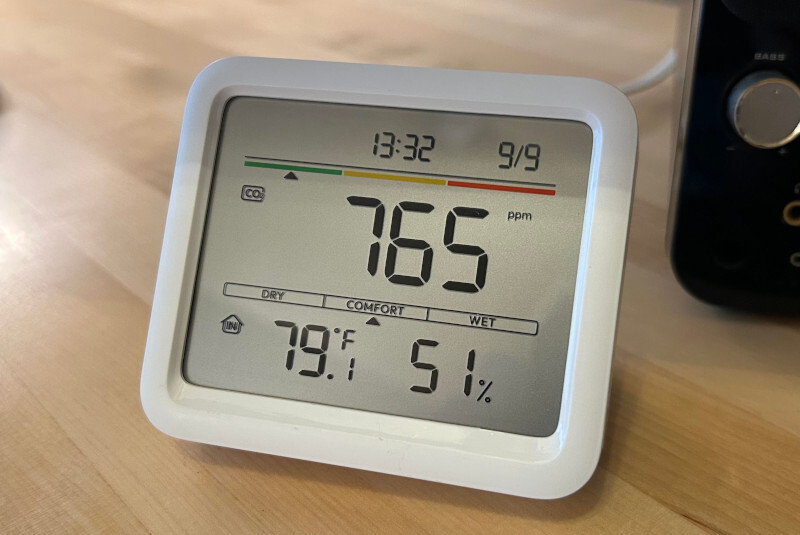
The main ick is that it needs an app for most of it’s functionality. And that app needs an account. And after you signup they’ll send you marketing emails. And you need to give the app permissions for bluetooth and location (location only needed for Android). The app is the only way to change device settings, see data over time, and update firmware.
Reverse Engineering
So, let’s access the data programmatically, without a darn app!
The device and the companion app communicate over Bluetooth Low Energy (BLE). We can snoop on (record) this communication in order to send (replay) the same commands from our own programs.
Current Sensor Data
Thankfully many others have done the work in order to read and decode the current sensor values. This is broadcast from the device in BLE advertisements, which allow listeners to get a small amount of data without needing a bluetooth connection. Here is the format:
Service data example 0x350064
| Bytes | Value | Explanation |
|---|
| 0 | 35 | & 0x7F device type, 0x35 for Meter Pro CO2. Bit 7 is encrypted flag |
| 1 | 00 | group / reserved |
| 2 | 64 | & 0x7F battery percentage. 100% |
Battery is at 0x64 which is 100%, since I have it plugged in.
Manufacturer data is 16 bytes. Example b0e9feb8d4e2 36e4 02 9a b4 0016 02a9 00
| Bytes | Value | Explanation |
|---|
| 0-5 | b0e9feb8d4e2 | device MAC address |
| 6-7 | 36e4 | unknown |
| 8 | 02 | & 0x0F temperature decimal, in tenths of degree celsius |
| 9 | 9a | & 0x7F temperature whole number degree celsius. & 0x80 is the sign bit where 1 means positive, 0 is negative |
| 10 | b4 | & 0x7F humidity percentage. & 0x80 is the display-in-F flag |
| 11-12 | 0016 | unknown |
| 13-14 | 02a9 | CO2 in ppm, big-endian unsigned |
| 15 | 00 | padding |
So b0e9feb8d4e2 36e4 02 9a b4 0016 02a9 00 is 681 PPM, 26.2C (79.2F because of F flag), 52% humidity.
I wrote a script that listens for this data:
$ ./co2Adv.py --csv co2.csv
Scanning for any Meter Pro in range... (ctrl-c to stop)
2026-09-09T10:22:39-05:00  B0:E9:FE:B8:D4:E2   25.0 C   58%    671 ppm  batt 100%   -67 dBm  Meter Pro CO2
2026-09-09T10:22:59-05:00  B0:E9:FE:B8:D4:E2   25.0 C   58%    749 ppm  batt 100%   -69 dBm  Meter Pro CO2
2026-09-09T10:24:26-05:00  B0:E9:FE:B8:D4:E2   25.0 C   57%    715 ppm  batt 100%   -68 dBm  Meter Pro CO2
2026-09-09T10:24:50-05:00  B0:E9:FE:B8:D4:E2   25.1 C   57%    715 ppm  batt 100%   -73 dBm  Meter Pro CO2
2026-09-09T10:27:54-05:00  B0:E9:FE:B8:D4:E2   25.1 C   56%    703 ppm  batt 100%   -69 dBm  Meter Pro CO2
Accessing Stored Data
In the companion app connecting to the device will download previous sensor data that is stored on the device. I wanted access to this data too. I didn’t find anyone else who reverse engineered this.
I started by downloading the companion app on my old Android phone, and trying to get the “Bluetooth HCI snoop log” for when I run the data sync in the app. The log didn’t get created or I couldn’t find it on the device through adb. I’m not sure why.
I did have luck using Wireshark with the Android Bluetooth Btsnoop Net .... config. It was really easy to get a packet capture.
At this point I used Claude to figure the format of some of the messages. It got some like the read request and response.
There were some messages that Claude could not figure out and just speculated. So I pulled the APK from the Android phone and used JADX to decompile it. After looking through the slightly obfuscated code I confirmed the format of the messages seen during the data sync. The most interesting parts are below. Details are in the repository.
Messages Passed
send 0x0011                                   CCCD enable
send 570f6805040000000000000000000000         DST config
recv 01                                       OK
send 0x0011                                   CCCD enable (again)
send 5700050308 00000000 6a9e1faf 00          Set device date+time
recv 01                                       OK
send 570f690801                               Get data section info
recv 01 510100040302                          Data section info
send 570f69080201                             Get section 1 info
recv 01 6a9e1a4b 6a9e1f73 0000000c 0078       Section info
send 570f690803 01 00000000 04                Get 4 records @ offset 0
recv 01 99307799300285028c993088993002770272  Read response
send 570f690803 01 00000004 04                Get 4 records @ offset 4
recv 01 9931999931027a02799a32009a33028c0287  Read response
send 570f690803 01 00000008 04                Get 4 records @ offset 8
recv 01 9a34119a34029102999a34129a3402a702aa  Read response
... continue for however many records
Read request
| Byte | Value | Explanation |
|---|
| 0 | 57 | magic |
| 1 | 0f | command ID 15 (no password) |
| 2 | 69 | subcommand number for history / storage |
| 3-4 | 0803 | sub command ID for read samples |
| 5 | 01 | section ID (from previous section information response) |
| 6-9 | 00000008 | offset / index start |
| 10 | 04 | number of records requested |
The app requests 4 records at a time, and 2 records at the very end if needed.
Examples:
570f690803 01 00000008 04 - offset 0x8, read 4 records. The response will be 18 bytes.570f690803 01 0000017c 02 - offset 0x17c, read 2 records. The response will be 9 bytes.
Read Response for 4 records
The response holds a status byte first (01 for success), and then two groups of 9 bytes, each group has two records. For example 01 99307799300285028c 993088993002770272.
Here’s the format for the first group 99307799300285028c:
| Byte | Value | Explanation |
|---|
| 0 | 99 | Record A temperature in celsius, the whole number part (& 0x7F). The 0x80 bit high means positive, low means negative |
| 1 | 30 | Record A humidity in percent (& 0x7F). The 0x80 bit is for display in Fahrenheit option |
| 2 | 77 | High and low nibbles for A/B temperature decimal parts respectively, in tenths of a degree celsius |
| 3 | 99 | Record B temp whole part |
| 4 | 30 | Record B humidity |
| 5-6 | 0285 | Record A CO2 PPM big-endian |
| 7-8 | 028c | Record B CO2 PPM big-endian |
So this gives us:
- record A = 25.7C (78.3F), 48% humidity, 645 CO2 PPM
- record B = 25.7C (78.3F), 48% humidity, 652 CO2 PPM
Now I don’t need the app to get the history:
$ ./co2Hist.py --start 2026-09-07 --end 2026-09-08 --csv co2.csv
Scanning...
Connecting to B0:E9:FE:B8:D4:E2...
1 section(s): [1]
721 of 1960 records, one every 120s, 2026-09-07 00:00 to 2026-09-08 00:00
fetching 181 pages...
[##############################] page  181/181    721/721 records  ETA    0s
done in 18.3s
2026-09-07T00:00:00-05:00   26.0 C   52%    716 ppm
2026-09-07T00:02:00-05:00   26.0 C   53%    710 ppm
2026-09-07T00:04:00-05:00   26.0 C   53%    709 ppm
2026-09-07T00:06:00-05:00   26.0 C   53%    705 ppm
2026-09-07T00:08:00-05:00   26.1 C   54%    699 ppm
2026-09-07T00:10:00-05:00   26.1 C   54%    693 ppm
...
Thoughts
To be honest, using Claude took some fun and enjoyment out of this process. I’m happy I can move on to other projects, but at the same time I feel less satisfaction from the LLM usage. In the next project I’ll do more on my own.
I’m thankful that the BLE communication was not locked down, encrypted, or obfuscated in any way. The only other thing I could ask for would be for SwitchBot to publish the communication protocol for their devices (please, do this! It will only help the nerds!)
Next steps
I need to have some setup to continuously record the sensor information and save it somewhere. I’ll probably do this with a microcontroller and have it send the data to a HTTP server.
Thanks for reading. Source code is available here.