I explore all the HTML elements, and figure out which ones are just <div> and which have unique functionality.
As I’m learning about HTML I’m getting an odd feeling: there are so many tags which make HTML feel complex and large, while at the same time lots of elements seem not that special.
Also, when reading about HTML elements I often see the strong language such as “must be used inside a <foo> element”, “do not use the <foo> element to …” “can only be used to represent …”. Is this strong language really how HTML works? The answer is usually “no”.
Thus I spent too much time figuring out what HTML elements are the same, except for some differences in CSS. For example <h1> is the same as <h2> with adjusted font-size and margin-block. I’m figuring out what elements can be represented as a <div>. Div soup here we come!
To cut a long story short, out of 104 elements 60 are easily represented as a <div>. That’s almost two-thirds!
Overall classes of elements:
<div> and friends provide custom default styles. There are 60 of these.- widgets are things like
<img> and <video>. 11 of these. - input controls for
<input>, textarea>, <datalist>, etc. 12 of these. - non-content elements (usually found in
<head>) for <meta>, title, etc. 11 of these. - everything else like
<a>, svg, math. 12 of these.
My rules:
- if an elements needs JavaScript to be replicated (such as
<label>) I consider it to have special functionality - I ignore all deprecated elements such as
<frame> - I ignore new not widely supported elements
<fencedframe> and <selectedcontent> - I ignore automatic ARIA roles, since the global
role attribute can be used instead - there are a few elements such as
<audio> which can be replaced by <video> which are not in the <div> group. I’ll be ignoring these relations. Every element not in the <div> group is essentially unique.
Container Elements
I’m throwing semantic HTML out of the window. Elements like <main>, <header>, <footer> are equivalent to <div>.
Here’s the whole list: <address>, <article>, <aside>, <footer>, <header>, <hgroup>, <main>, <nav>, <search>, <section>
That’s 10 elements!
Also <address> has a default style of italic.
<span> and friends
I chose <div> as the base element but could have easily chose <span> instead. The only difference is block vs inline. Put a display: block on a <span> and now it’s a <div>.
There are 29 elements which are just a <span> with some CSS. For example:
<i> and <em> are just spans with font-style: italic<b> and <strong> have font-weight: bolder<u> has text-decoration: underline<br> is a span of a newline:.my-fake-br::after {
content: "\A";
white-space: pre;
}
<bdi> and <bdo> use unicode-bidi: isolate and unicode-bidi: bidi-override<wbr> is a span of <span>​</span> to allow a break. Don’t even need to wrap it in a , it’s just text content!
<h1> is just
.my-h1 {
    font-size: 2em;
    font-weight: bold;
    margin-block: 0.67em;
}
The rest of the headers up to <h6> have different values.
Paragraph
You may think <p> is special but it’s not! It’s just a <div> with margin-block: 1em 1em!
Horizontal Rule
<hr> is not special either:
.fake-hr {
    color: gray;
    border-width: 1px;
    border-style: inset;
    margin-block: 0.5em;
    margin-inline: auto;
    overflow: hidden;
}
Lists
Ordered and un-ordered lists - <ol>, <ul>, <li>, as well as definition lists <dl>, <dt>, <dd> are easily replicated as <div>s.
Quote
<q> automatically adds opening and closing double-quotes to the text. Use CSS pseudo-elements!
.fake-q::before {
    content: open-quote;
}

.fake-q::after {
    content: close-quote;
}
Tables
Tables and all of the table elements can be replicated with <div>. We can either use special CSS display values like table, table-header-group, table-cell, or just CSS grid.
You’ll need to use CSS grid when using colspan and rowspan. It’s worthwhile to note that using CSS grid collapses the nested structure of the regular <table>. While it’s possible to replicate <table> with CSS grid, it can get messy quickly!
Here’s a snippet of the first option:
.fake-table {
    display: table;
    border-spacing: 2px;
    border-collapse: separate;
    box-sizing: border-box;
    text-indent: 0;
}

.fake-thead {
    display: table-header-group;
    vertical-align: middle;
}

.fake-tr {
    display: table-row;
    vertical-align: inherit;
}

.fake-td {
    display: table-cell;
    vertical-align: inherit;
    text-align: unset;
    padding: 1px;
}
Here’s the complete grid option:
.fake-table-2 {
    display: inline grid;
    padding: 2px;
    gap: 2px;
    box-sizing: border-box;
    text-indent: 0;
}

.fake-th-2,
.fake-td-2 {
    vertical-align: inherit;
    padding: 1px;
    align-content: center;
}

.fake-th-2 {
    font-weight: bold;
    text-align: center;
}

.fake-td-2 {
    text-align: unset;
}
The above handles <table>, <thead>, <tbody>, <tfoot>, <tr>, <th>, and <td>.
For <col> use fancy CSS to style the column: #myTable>div:nth-child(9n+2). 9 is the number of columns and 2 is the second column. This doesn’t work if elements span multiple rows, so the fallback will be to style elements individually. Repeat across multiple columns for <colgroup>.
<caption> is a really cool element! It takes the same width of the table but is outside the table border and inside the table margin. We can use <div><div class="fake-caption">...</div><table>...</table></div> instead. Note that CSS ::before is inside the margin so is not a replacement.
Custom HTML elements
Custom elements allow us to make new HTML tags and define the styling ourselves, such as <my-big-blinking-text>. We are not limited to the official HTML tags.
Custom elements, specifically undefined custom elements (no Javascript), enable converting our <div class="my-fake-em"> to <my-fake-em>. Styling custom elements is the same as styling normal HTML elements.
See For Yourself!
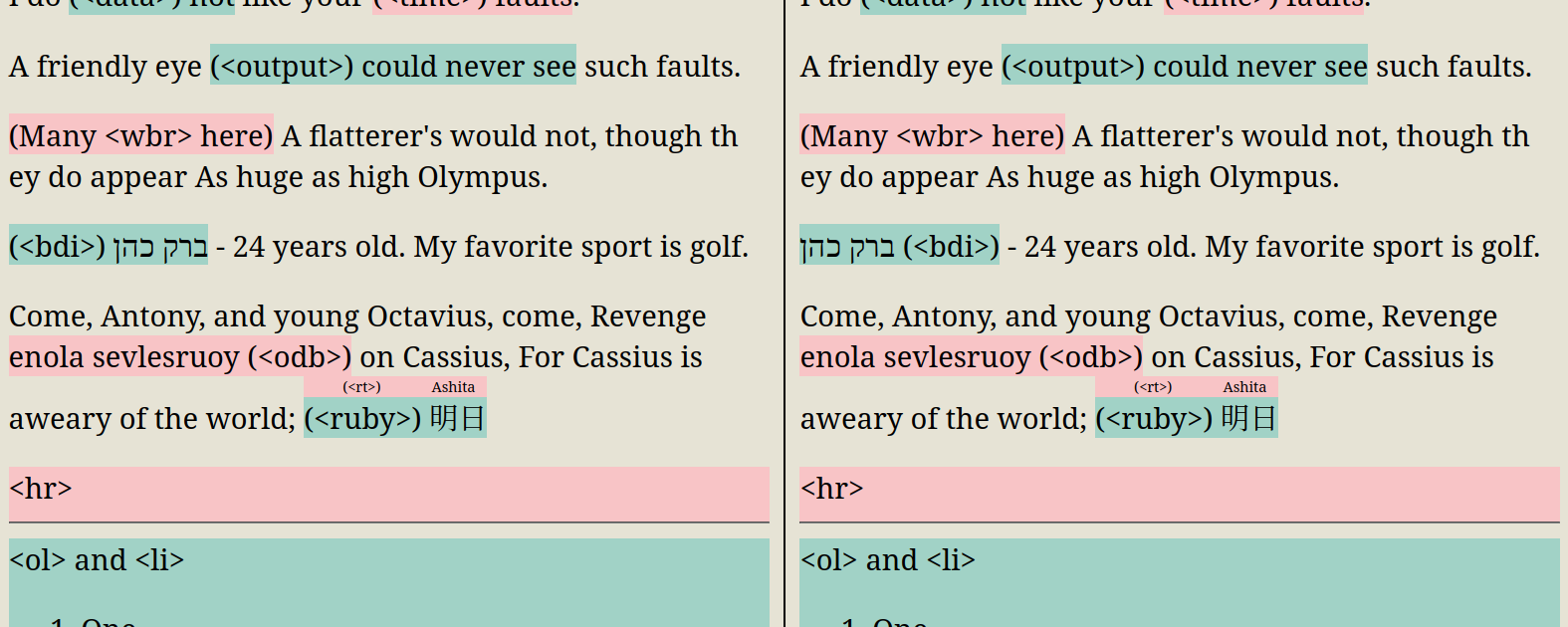
Here’s an example where everything on the left is the official HTML element, and everything on the right is a replicated version using custom HTML elements and CSS.
Conclusion
60 out of 104 HTML elements 60 are easily represented as a <div>. Categorizing HTML elements into “a <div> with some styling” or “actually has functionality” makes it easier and less scary to understand.
Essentially we’ve ended copy pasting the default browser CSS rules and using our own class names. If we used <span> as the base element instead of <div> our CSS would be even closer to the base user agent CSS.
Equivalency Tree
<div> and friends
<div> generic block-level container- container elements - semantic div for specific purpose
<address> - font-style: italic<article><aside> - need CSS to actually put it on the side lol<footer><header><hgroup><main><nav><search><section>
<span> genetic inline-level container. Just add display: block!<i> - font-style: italic<em> - font-style: italic<b> - font-weight: bolder<strong> - font-weight: bolder<u> - text-decoration: underline<br> - `.fake-br::after { content: “\A”; white-space: pre; }<del> - text-decoration-line: line-through. Attributes cite and datetime have no functionality.<ins> - text-decoration: underline. Attributes cite and datetime have no functionality.<s> - text-decoration-line: line-through<mark> - background-color: Mark and color: MarkText<code> - font-family: monospace<q> - CSS pseudo-elements before and after with content: open-quote and content: close-quote respectively. Cool! Attribute cite has no functionality.<small> - font-size: smaller<sub> - vertical-align: sub and font-size: smaller<sup> - vertical-align: super and font-size: smaller<var> - font-style: italic<abbr> - text-decoration: dotted underline (only when have the title global attribute).<cite> - font-style: italic<dfn> - font-style: italic<kbd> - font-family: monospace<samp> - font-family: monospace<data> - just a span! Use data-* attribute for the value attribute<time> - just a span! Use data-* attribute for the datetime attribute<bdi> - unicode-bidi: isolate<bdo> - unicode-bidi: bidi-override and set the dir attribute or CSS direction to something<wbr> - <span>​</span> or can use entity name ​ allows to break. Don’t even need to wrap in a <span>, it’s just text content!<output> - just a span! Associated <output> form elements are accessible in JS at myForm.elements, but <output> is not included in form submission. Essentially has no functionality.<ruby> - display: ruby<rt> - display: ruby-text, white-space nowrap, and 50% font.
- headers
<h1> - font-size: 2em, font-weight: bold, margin-block: 0.67em<h2> - similar with different values<h3><h4><h5><h6>
<pre> - font-family: monospace, white-space: pre, margin-block: 1em<blockquote> - margin-block: 1em, margin-inline: 40px<p> - margin-block: 1em 1em<hr> - color, border, margin. See above.<ol> - list-style-type: decimal and some margins. Ignoring the reversed attribute (reversed the numbering, not the content).<li> - display: list-item, and some text align. The value attribute can be emulated by setting style="counter-set: list-item 100<ul> - same as <ol> with list-style-type: disc<dl> - has some margin<dt> - some bold font and top margin<dd> - has a left margin<figure> - has some margin<figcaption> - same as a <div>- tables
<table> - display: table, border-collapse and box-sizing<thead> - display: table-header-group<tbody> - display: table-row-group<tfoot> - display: table-footer-group<tr> - display: table-row<th> - display: table-cell, bold font. Use grid solution to support colspan and rowspan<td> - display: table-cell. Use grid solution to support colspan and rowspan<caption> - See above<col> - See above. Use CSS.<colgroup> - See above. Use CSS.
<img> - an image, or SVG<picture> - an image with <source> elements. Distinct from <img> because it allows changing the image based on media query, whereas <img> should only be used to change between different sizes of the same image (some browsers will always use the largest image they need so far which gets the <img> “stuck” with the larger option)<meter> - browser UI element to show value in a range<progress> - similar to <meter>. Have the indeterminate state.<video> - video player!<audio> - very similar to <video>. Give video specific height and width to make it look like <audio>. <video> can also handle subtitles and captions.
<track> - captions or subtitles for <video> and <audio><object> - embed lots of things like images, HTML pages, audio, video, PDF, svg. Most of the time it’s better to use <img>, <iframe>, <audio>, <video>. Good use for PDF.<embed> - original version superseded by <object>
<canvas> - pixel-level control<iframe> - could be under <object> but <iframe> has lots of more attributes
<input> - use for a button, checkbox, color picker, text box, file input, password input, radio button<button> - better than <input type="button"> since <input> is self-closing and <button> can have any HTML content inside<fieldset> - a div with margin, padding, and border. Unfortunately not under <div> since <legend> only works with <fieldset>.<legend> - a cool option to put an element on the border of <fieldset>. Acts like on border of <fieldset>, overlapping border is removed (even with transparency), content wraps and remain like a “child” of the <fieldset> (not like an absolutely positioned element).<textarea> - multiline input text<label> - almost just a <span>, but allows focus to be directed to a target element. This is something that could only be replicated with JS.<datalist> - preset list of options user can choose from, applicable to different types of <input><select> - dropdown list of options. Could probably replace with lots of HTML/CSS/JS but I choose not to.<optgroup> - used with <select><option> - used with <select>
Everything Else
<dialog> - open and close dialog boxes<a> - links, and file downloads<map> - see below<area> - map is a zero-width container for area. Area is just a <a> that is positioned carefully! Use position: relative and absolute. Use border-radius for circles, and clip-path for polygons. The nice thing about not using <area> is that you can actually style <a>, which <area> can’t do!
<details> - see below<summary> - very close to being able to replace with a <input type=”checkbox”> and some fancy CSS. I could not copy the <details> name attribute behavior. I did get an exact copy with a single “details” not in a group. See “Extra Notes - <details> and <summary>”<svg> - allows more things than a SVG in a <img><math> - math formula<form> - able to send network requests to server based on user action, without any JS!<rp> - fallback content when browser doesn’t support <ruby>. Even though all major browsers have supported <ruby> for more than a decade, <rp> still provides functionality that can’t be replicated.<template> - web components thing<slot> - web components things
Non-Content tags
<noscript> - would need JavaScript to emulate<html> - not trying to break or abuse HTML format and parsing<head> - not trying to break or abuse HTML format and parsing<body> - not trying to break or abuse HTML format and parsing<title> - set the tab’s title<link> - load external CSS files, preload/prefetch pages<style> - CSS embedded directly. There may be slight differences but I don’t care.<base> - just set href and target attributes exhaustively on every link (<a>, <link>, <area>, <form>, <img>, anything with src, href, action attributes)
<script> - embed or download external JS, JSON, GLSL<meta> - lots of features like redirects, color schemes, viewport sizing<source> - used with <picture>